
Guide
Handing a housing society over from the builder to the committee
Updated
Written by the Ekvasa team at Colligo Infotech. How we write our guides.
This guide is general information, not legal advice. The rules differ from state to state and with your society’s bye-laws, so check them, and ask a lawyer or your registrar when in doubt.
What the handover means
Before the society takes over, the builder usually runs the building. The Real Estate (Regulation and Development) Act, 2016 makes the promoter responsible for essential services, on reasonable charges, until the association of allottees takes over maintenance.
Source: indiacode.nic.in, checked on 22 November 2026.
The same Act asks the builder to obtain the occupancy certificate and make it available to the buyers or their association, and to execute a registered conveyance deed, with the common areas going to the association of buyers, within the time local law sets.
Our glossary explains these words. Your state’s law and your society’s bye-laws decide the details: when the association is formed, how the first committee is chosen, and what the builder hands over.
Set the society up before possession
A builder does not have to wait for the committee. On the request form, choose Builder or developer as your role. The Ekvasa team calls you, creates the society and invites its first admins. The gate, maintenance bills and complaints then work from the first day, so buyers move into a society that already runs.
Plans are agreed one to one, in writing, when the team calls. How onboarding works has every step, from the first call to the go-live day.
Bring in the homes and buyers from one file
The Ekvasa team sends one master file, in Excel or as a zip of CSV files. It has a sheet for each part of the society:
- the society itself, and its admins and committee;
- the homes, with their type and carpet area;
- owners and tenants, and their family;
- gate guards, parking slots and vehicles;
- amenities;
- billing settings and charges;
- opening balances.
The society, or the builder’s office for it, fills the file and the Ekvasa team imports it. Every sheet is checked first, with nothing saved, and what needs fixing comes back to the secretary as a copy whose first sheet is "Fix these first".
Importing the file again only adds what is new: a home or a person already there is left as it is, and a changed detail is reported, not written.
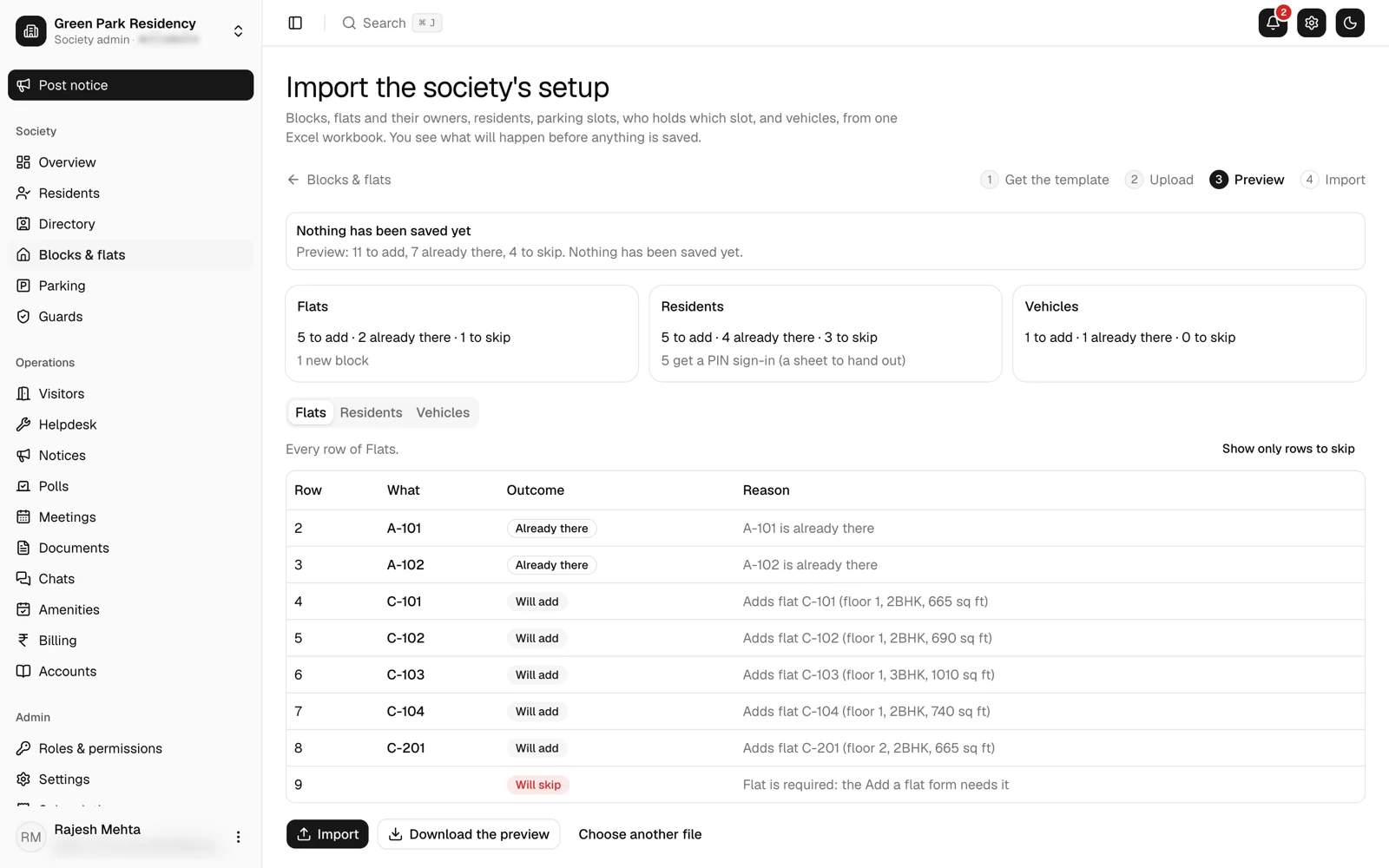
The import itself messages nobody. Welcome messages go out only when the Ekvasa team starts them, and for residents only after the society’s admins have confirmed the import, or the team has recorded that the society confirmed it another way.
Buyers imported with their email are let in when they first sign in. Others join with the society’s 8-character code, pick their home, and wait for the office to approve them.
Admins and roles during the builder’s period
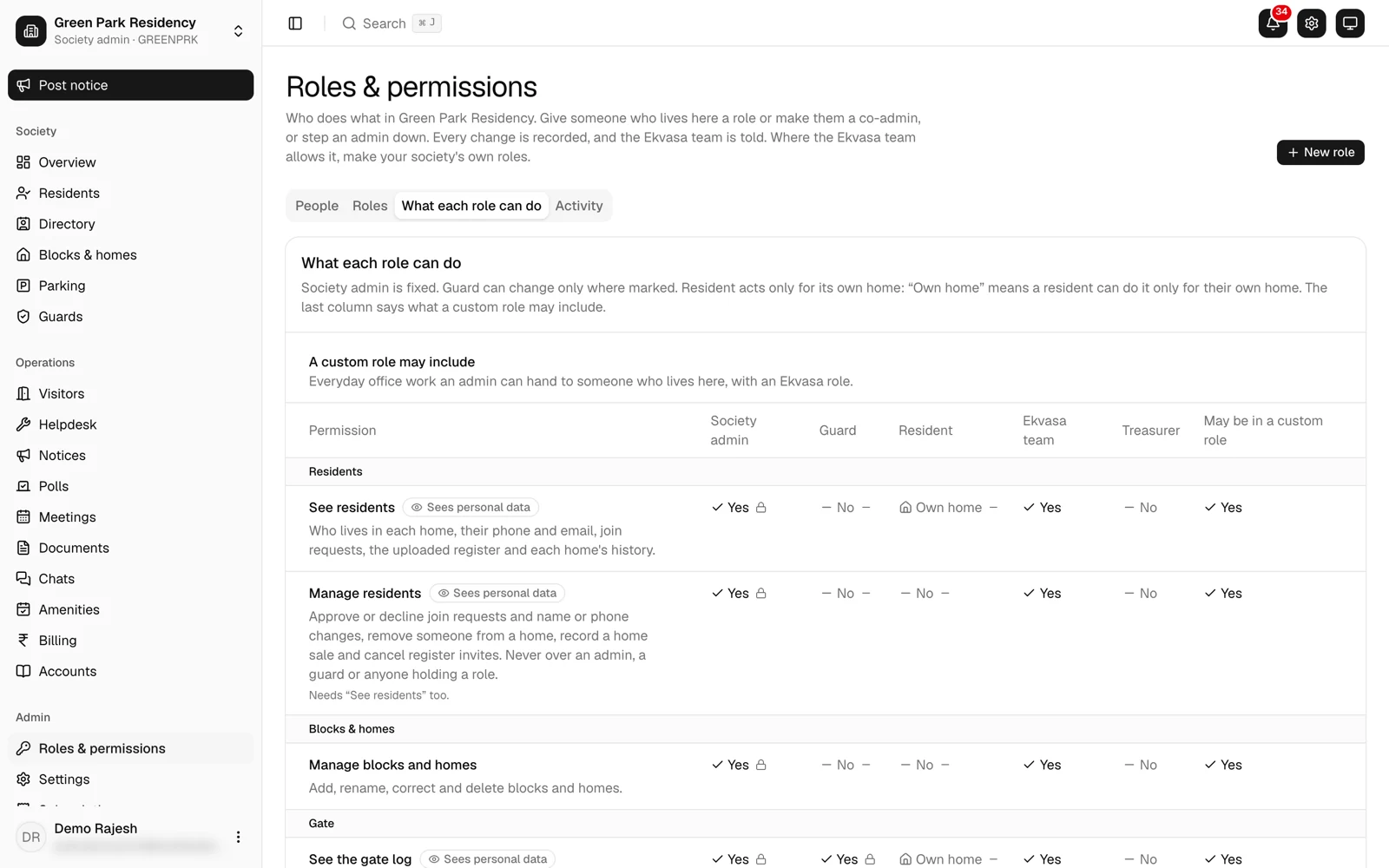
Until the committee is elected, the first admins the Ekvasa team invited hold the office side. Ekvasa has fixed roles for the rest of the work: Treasurer, Helpdesk, Notices and Committee member, each seeing only what it needs. Every change of admin or role goes into a record that cannot be edited.
A role or a co-admin can be given only to someone with an approved home in the society. Plan for this from the start: the people who will take over must have their homes in Ekvasa and approved.
The Ekvasa team opens a society’s records only in a recorded, time-limited support session. The admins are told at once, and they can see every session, who opened it, why and what changed.
Dues and opening balances on the handover date
Fix one handover date and use it everywhere. On that date:
- Each home’s opening dues go into the master file: what the home owes on the handover date.
- The society’s opening account balances go in too, such as the bank and cash balances on that date.
- The auditor confirms them. These become the society’s opening figures, so have them checked before the committee accepts them.
From that date the books are double-entry: bills, receipts and notes post themselves, so the accounts always agree with billing. For the AGM and the auditor, the office has income and expenditure, receipts and payments and the balance sheet, in Excel or printed, and a file Tally can import. See moving from Tally or Excel.
Before the first bill, open the bank account and the UPI ID in the society’s own name, so dues go to the society. Our guide on collecting maintenance by UPI explains the ways homes can pay.
Documents and the asset register
The handover is also a pile of papers. Put them where the committee will find them:
- The documents shelf. Bye-laws, minutes, audit reports and circulars, each shared with everyone, with owners only, with the committee or with one home. See documents.
- The asset register. Lifts, pumps, generators, CCTV and fire systems, each with its vendor, warranty, AMC and papers. The office is reminded before an AMC or a warranty ends, and the register downloads as Excel. See assets and AMCs.
A good use of both: the builder’s handover file. Put the warranties and AMCs for each piece of equipment in the asset register, and the drawings and other papers the builder hands over on the documents shelf, shared with the committee.
Electing the committee
Ekvasa can run the vote. The owners elect the committee by a secret vote, each home voting for up to the number of seats. When voting closes, the office prints a result certificate with the votes, the turnout and the elected candidates, and a tie for the last seat is flagged. See elections.
Hold the election the way your state’s law and your bye-laws require; the app records the vote, it does not replace those rules.
Passing the admin role to the committee
Once the committee is elected, hand the office side over in this order:
- The elected members sign in, each with their home approved in Ekvasa.
- An admin makes each of them a co-admin, or gives a member the role they need, such as Treasurer.
- Earlier admins not on the committee step down. A society always keeps at least one admin, so the committee is made admin first.
- Every change is recorded. The Ekvasa team is told of each new co-admin and can undo a wrong one.
- The committee reviews every contract the builder signed, the society app’s included, and decides what to keep.
A handover checklist to copy
Change the words in square brackets and keep the signed copy with the committee’s records.
[Society name]: handover from the builder on [handover date]

[ ] List of homes and their owners, checked against the sale records
[ ] Share register (or the members' register your bye-laws require)
[ ] Each home's dues on [handover date]
[ ] The society's opening balances, confirmed by [auditor]
[ ] Bank account and UPI ID in the society's name
[ ] Warranties and AMCs for each piece of equipment
[ ] Drawings and papers handed over by the builder
[ ] Keys and the gate phone
[ ] Admin role passed to [names of committee members]
[ ] Earlier admins not on the committee stepped down on [date]
[ ] The old app agreement reviewed by the committee

Signed: [for the builder]          [for the committee]
What Ekvasa does not do
- No snag lists or possession scheduling. Defects and key handover dates stay with the builder’s own process.
- No conveyance or legal work. The conveyance deed, the occupancy certificate and the registration of the society are for your lawyer and the authorities.
- No link to boom barriers, RFID or number-plate cameras. Ekvasa’s gate runs on the guard’s phone.
- The office’s web console is in English for now. The app, its notifications and bills come in English, Gujarati and Hindi.
Questions committees ask
Can a builder set Ekvasa up before possession?
Yes. The Ekvasa team can set the society up before handover, so the gate, maintenance bills and complaints work from the first day. Request onboarding and choose Builder or developer as your role.
Who pays for the app during the builder’s period?
Plans are agreed one to one, in writing; ask the team when you request onboarding. At the handover, the committee reviews that agreement like any other contract the builder signed.
What happens to residents’ data if the committee chooses another app?
The society’s data belongs to the society. Ekvasa gives the society a copy of its data on request, during the service and for 30 days after it ends, and deletes it when the society asks in writing, except what the law requires Ekvasa to keep. The society can stop at any time by writing from its registered email. See our terms.
Comparing apps before you decide? Our committee checklist for choosing a society app has the questions to ask, and if the builder set up the app covers a move after the handover.
Where to check the rules
These official sources are examples to read for yourself, not rules that apply to every society. Your state’s law and your society’s own bye-laws have the final word.
- Real Estate (Regulation and Development) Act, 2016 (India Code)
- Your state’s co-operative department and the registrar’s office for your area, and your society’s registered bye-laws.
Do this in Ekvasa
Ekvasa keeps bills, receipts, notices and records in one app for the office and every home. The Ekvasa team sets your society up with your own data.