
Guide
Collect society maintenance by UPI, straight to the society's bank account
Updated
Written by the Ekvasa team at Colligo Infotech. How we write our guides.
Can a society collect maintenance by UPI without a payment gateway?
Yes. There are two quite different ways money can reach the society:
- Paying a UPI ID. The resident’s bank sends the money to the society’s bank, bank to bank. No gateway company stands in between, so no gateway takes a cut.
- Paying through a payment gateway. A gateway company collects the payment, then settles it to the society’s account a little later, and charges for that service.
For the first way, the society needs a current account in its own name with a UPI ID from its bank.
Ask your bank whether it charges anything for UPI money received in the society’s current account. Banks set their own terms.
How it works in Ekvasa: a UPI link and QR on every bill
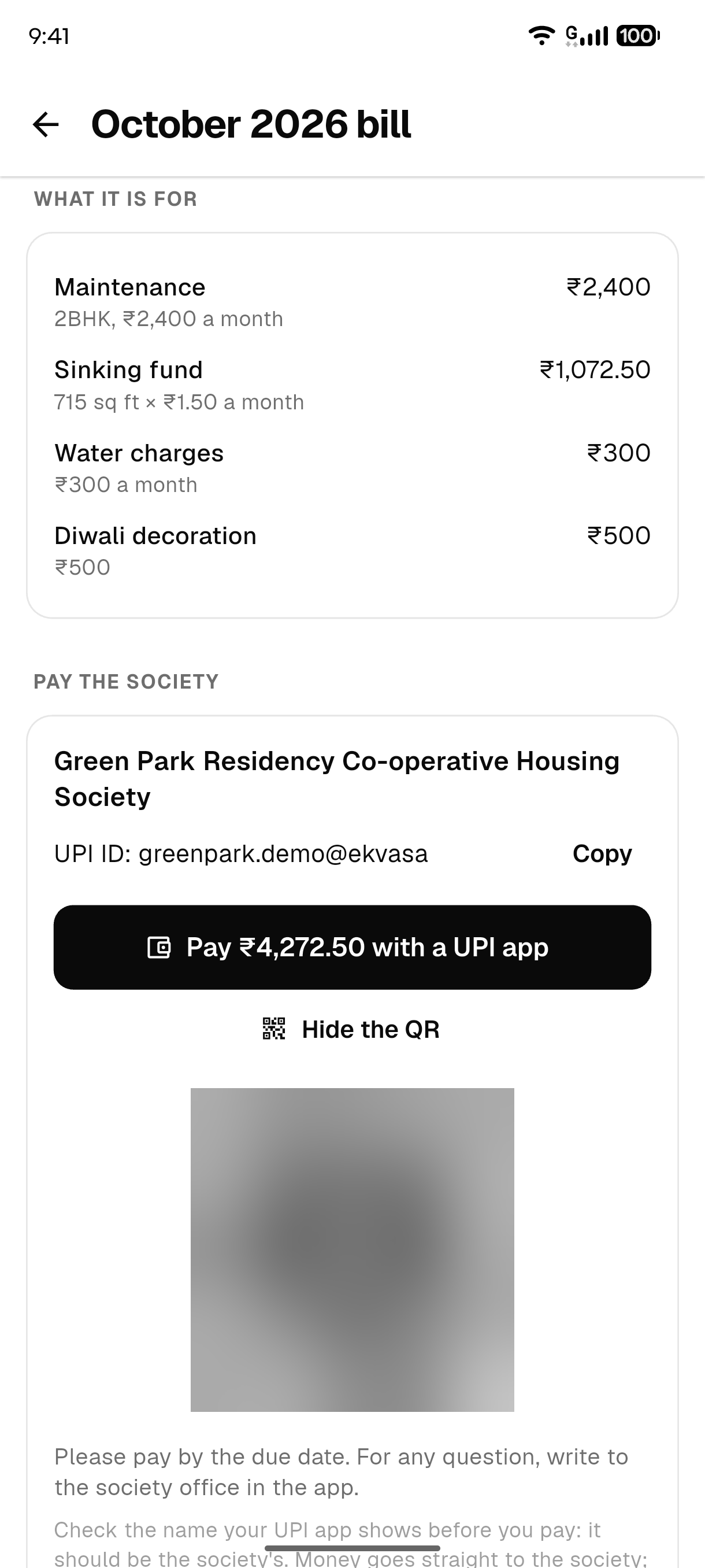
Every bill in Ekvasa carries a UPI link and a QR with the society’s own UPI ID, the exact amount and the bill number. The resident opens the bill, taps the link or scans the QR, and pays from any UPI app they already use.
- The money goes straight to the society’s bank account. Ekvasa never holds it.
- The amount and the bill number are already filled in, so the payment is easy to match later.
- Every change to where residents pay is kept, and every admin is told.
How the office confirms a payment
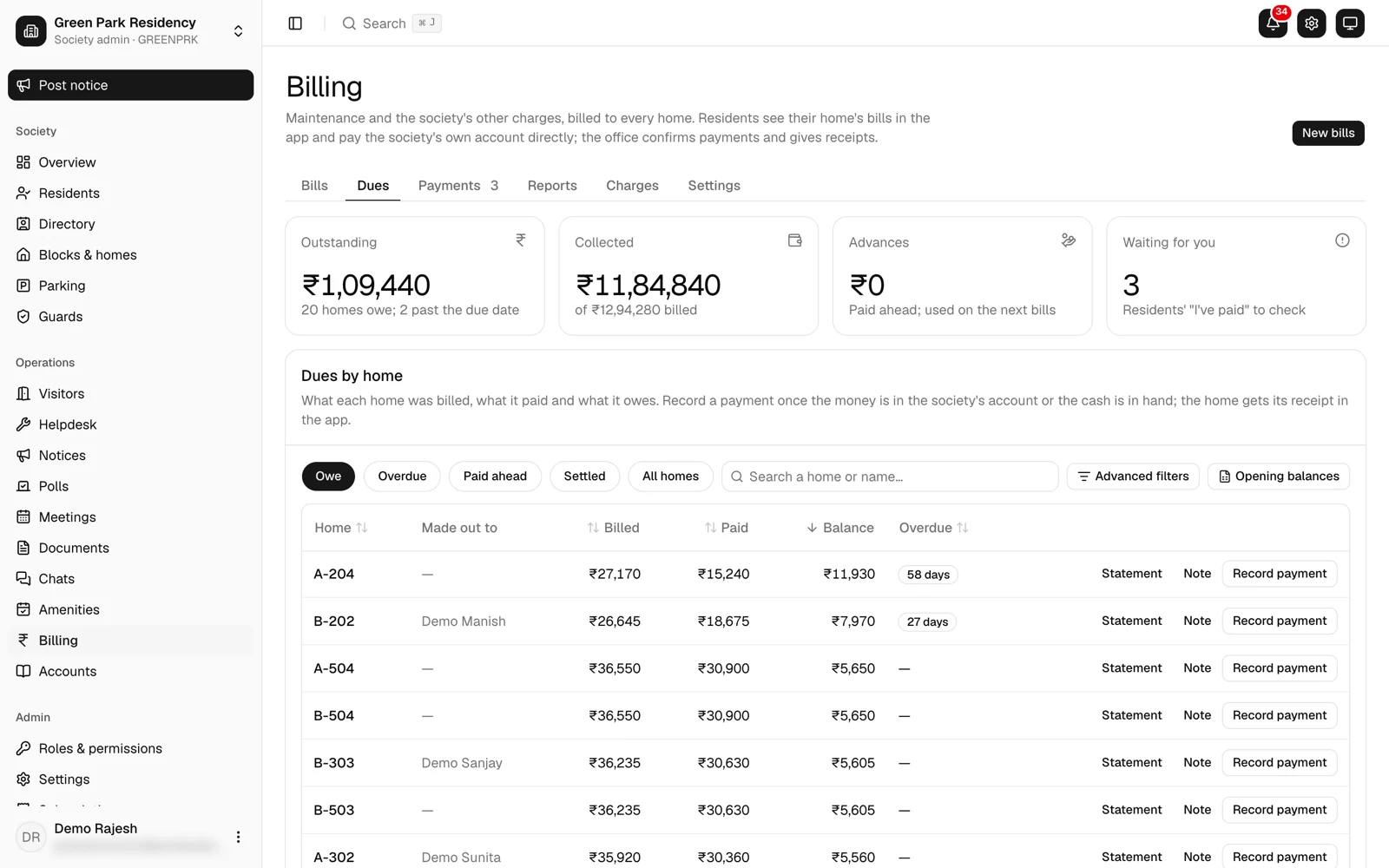
- After paying, the resident taps I’ve paid on the bill and adds the UTR. The UTR is the 12-digit UPI transaction ID: in the UPI app, open the payment and look for "UPI transaction ID" or "UTR".
- The office checks the UTR against the society’s bank statement and confirms it.
- The receipt appears in the resident’s app.
A few rules keep the books tidy:
- Payments settle the oldest bill first, and anything paid over becomes the home’s advance for the next bill.
- The office can confirm a payment from the app even with no network. It is sent as soon as the network is back.
- The office can upload the bank’s statement, and Ekvasa matches each statement line with the receipts already in the books.
- Cash, cheques and bank transfers are recorded by the office too, so every home’s payments sit in one place.
The second way: Pay online and auto-pay through the society’s own Razorpay
Some offices would rather not check each UTR. For them, a society can switch on Pay online through its own Razorpay account.
- The society opens and owns its Razorpay account and its keys.
- Residents pay inside the app by UPI, and by card or net banking where the society switches those on. UPI is always one of the methods.
- Razorpay settles the money to the society’s own bank account.
- The receipt is recorded the moment Razorpay confirms the payment, with nothing to send to the office.
Charges. Razorpay’s own charges apply to Pay online and auto-pay, and Razorpay invoices them to the society. Any charge is shown in the app before the resident pays. The society chooses whether the resident or the society bears the card and net-banking charge. Ekvasa adds no fee of its own. Ekvasa is a Razorpay partner, and may receive a part of that charge from Razorpay.
Auto-pay. A resident approves once, in their UPI app, bank or card. Each bill of the home is then taken by itself a few days before its due date, within a cap the society sets, with the receipt in the app. The office sees every mandate and can stop one, and residents stop theirs from the bill. Auto-pay needs Razorpay to switch on recurring payments for the society’s account first.
Pay by UPI on the bill stays on for every society, whether or not it uses Pay online.
The two ways side by side
| UPI on the bill | Pay online (society’s Razorpay) | |
|---|---|---|
| Where the money goes | Straight to the society’s bank | Through Razorpay to the society’s bank |
| Payment gateway | None | Razorpay, on the society’s own account |
| Ekvasa’s fee | None | None (Ekvasa, as a Razorpay partner, may receive a part of Razorpay’s charge) |
| Gateway charges | None | Razorpay’s own charges; any charge shown before paying; the card and net-banking charge borne by the resident or the society, as the society chooses |
| Receipt | After the office confirms | At once |
| Office work | Checks each UTR | None for each payment |
| Methods | Any UPI app | UPI, plus card and net banking where the society switches them on |
| Auto-pay | No | Yes, once Razorpay enables recurring payments |
Which way suits your society
- UPI on the bill suits a committee that wants no gateway at all and has someone in the office who can check payments against the bank statement.
- Pay online suits an office that would rather not check UTRs, or residents who want to pay by card or set up auto-pay.
- Both can run together. Residents who prefer UPI on the bill keep it, and those who prefer Pay online use that.
What the committee sets up
- The society’s UPI ID, on the society’s own bank account, entered once.
- Who confirms payments: an admin, or a committee member given a role that can record payments. See roles for the committee.
- For Pay online: the society’s own Razorpay account, connected through the online payments card in the console. See online payments.
Choosing an app for the first time? Our guide to choosing a society app has the full checklist, and the guide to a gate app that works without internet covers the guard’s side.
Questions committees ask
Does Ekvasa hold the society’s money?
No. With UPI on the bill, the money goes straight from the resident’s bank to the society’s bank. With Pay online, Razorpay settles it to the society’s bank account. Ekvasa never holds it.
Is there a charge for UPI on the bill?
There is no payment gateway, so there is no gateway fee, and there is no Ekvasa fee. Ask your bank whether it charges anything for money received in the society’s account.
Can residents still pay by cash or cheque?
Yes. The office records cash, cheques and bank transfers, and the receipt appears in the resident’s app.
Can we use both ways?
Yes. UPI on the bill stays on for every society, and Pay online can be switched on beside it.
What does the auditor see?
Every receipt posts to the society’s double-entry books, whichever way it was paid. The bank statement import matches the bank’s lines with the receipts, so the bank balance sits beside the books. See society accounting.
Do this in Ekvasa
Ekvasa keeps bills, receipts, notices and records in one app for the office and every home. The Ekvasa team sets your society up with your own data.