
Guide
Maintenance register format for housing societies
Updated
Written by the Ekvasa team at Colligo Infotech. How we write our guides.
This guide is general information, not legal advice. The rules differ from state to state and with your society’s bye-laws, so check them, and ask a lawyer or your registrar when in doubt.
What is a maintenance register?
It is the office’s working record of the society’s dues. When a member asks "how much do I owe?", or the auditor asks "who has not paid?", the answer comes from this register.
It is not the same as the members’ register or the share register. Those are statutory registers, and their forms are set by your state’s co-operative societies law and its rules. The Ministry of Co-operation lists every state’s act, linked at the end of this page. The maintenance register is about money: bills, payments and balances.
A good register answers three questions at any time:
- What did we bill this period, and to whom?
- What did we receive, from whom, and how?
- What does each home owe today?
The three parts and their columns
| Part | One line for | Main columns |
|---|---|---|
| Bill register | Each bill | Bill number, home, period, charges, total, due date |
| Receipt register | Each payment | Receipt number, home, date, mode, reference, amount |
| Home ledger | Each bill or payment of one home | Date, details, billed, paid, balance |
Keep the bill and receipt numbers in one unbroken series each. A missing or repeated number is the first thing an auditor notices.
Formats you can copy
Change the words in square brackets. In a spreadsheet, put each part on its own sheet.
[Society name]    Bill register for [period]

Bill no. | Home | Member name | Maintenance | Sinking fund | Repair fund | Water | Other | Arrears | Total | Due date
[number] | [Home number] | [Name] | [amount] | [amount] | [amount] | [amount] | [amount] | [amount] | [amount] | [date]

Total billed this period: [amount]
Prepared by: [Name]    Checked by: [Name]
[Society name]    Receipt register for [period]

Receipt no. | Date | Home | Member name | Mode (UPI / cheque / cash / bank) | UTR or cheque no. | Bills settled | Amount
[number] | [date] | [Home number] | [Name] | [mode] | [reference] | [bill numbers] | [amount]

Total received this period: [amount]
Matched with bank statement on: [date]    By: [Name]
[Society name]
Home: [Home number]    Member: [Name]    Area: [carpet area]

Date | Details | Bill or receipt no. | Billed | Paid | Balance
[date] | Opening balance | | | | [amount]
[date] | Bill for [period] | [bill number] | [amount] | | [amount]
[date] | Payment by [mode] | [receipt number] | | [amount] | [amount]
[date] | Credit note: [reason] | [note number] | | [amount] | [amount]
Write a balance that the home owes as a plain figure, and an advance the home paid ahead with "Adv". Use one way for every home.
How to keep it, month by month
- Issue the bills and write each one in the bill register on the day it goes out.
- Post each bill to that home’s ledger page.
- Record each payment in the receipt register the day it arrives, and give a numbered receipt.
- Settle the oldest bill first and post the payment to the home’s ledger. If a home pays more than it owes, carry the rest as an advance.
- Match with the bank once a month: every UPI or bank entry should have a receipt, and every receipt should be in the bank or the cash book.
- List the homes with dues at the end of the month, by how long they are overdue. Send reminders from our maintenance reminder format, and follow the steps for defaulters for homes that stay unpaid.
- Close the period: the total billed, less the total received, should equal the change in dues across all home ledgers.
Mistakes to avoid
- Changing an old entry. Never strike out or overwrite a bill. If it was wrong, write a credit note or a debit note as a new line, so the history stays clear.
- Cash without a receipt. Every payment, however small, gets a numbered receipt.
- Screenshots as proof. A payment screenshot is not a receipt until the office finds the money in the bank.
- Mixing the funds. Keep the sinking fund and repair fund in their own columns, so their totals are clear. See the sinking fund guide.
- Forgetting opening balances. When you start a new register, carry in each home’s old dues and advances first.
- One person doing everything. Have a second person check the totals each month.
How Ekvasa helps
Ekvasa keeps all three parts for the office. Each charge, such as maintenance, the sinking fund or water, is a charge head set for each home by carpet area or by home type.
The office runs bills monthly, quarterly or yearly, sees a preview first, and every bill is numbered in the society’s own series. A bill is never edited once it has gone out: a mistake is corrected with a credit note or a debit note. See maintenance bills.
When a resident pays, they tap I’ve paid and add the amount, the date and the UTR. The office checks it against the bank and confirms it, and the resident gets a receipt in the app. Cash, cheques and bank transfers are recorded too. Payments settle the oldest bill first, and anything paid over becomes the home’s advance.
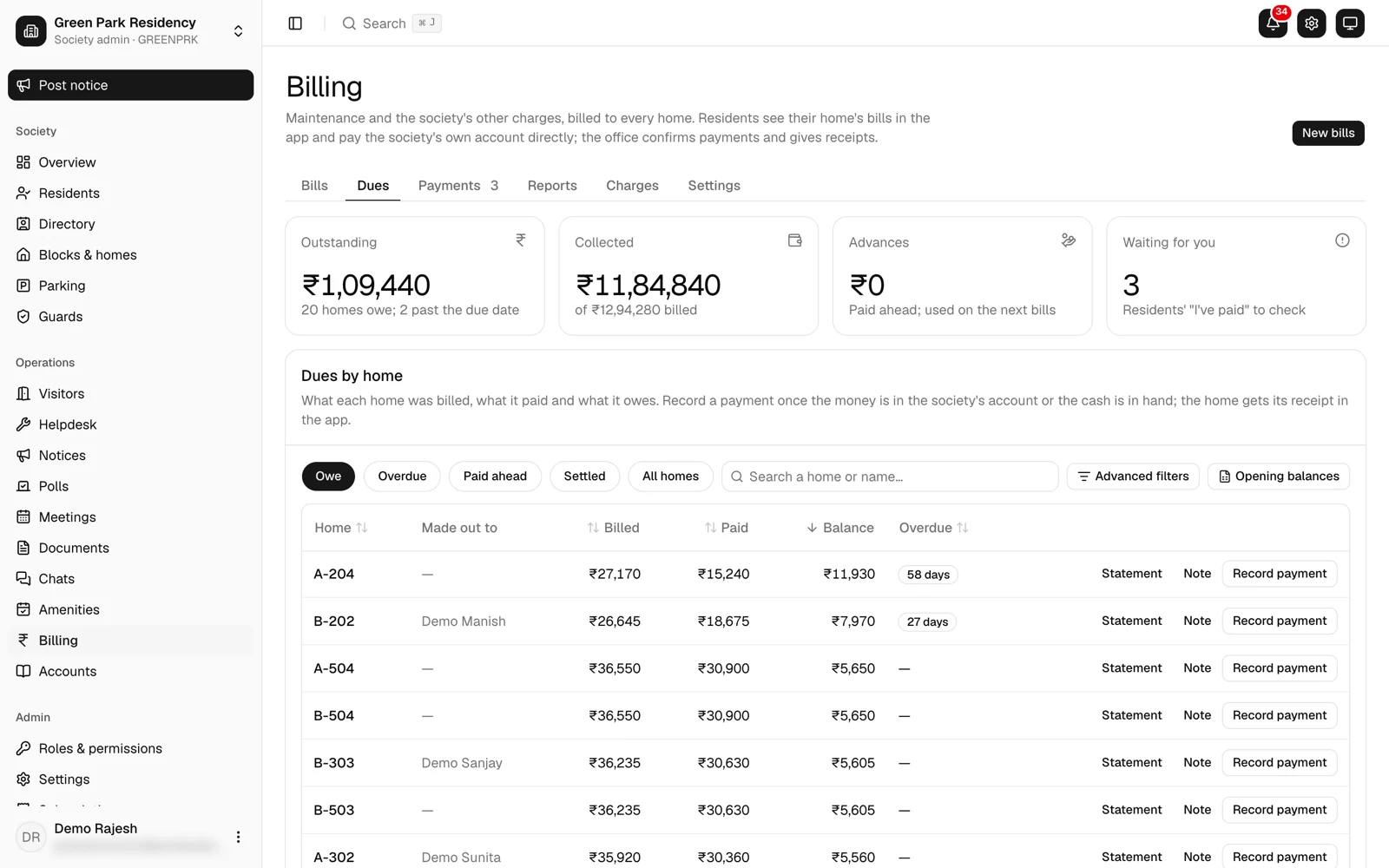
The office sees dues by days overdue, each home’s statement, and the ageing, collection and defaulters reports, all with Excel export. See dues and reports. The old register’s opening dues come in from Excel, with a preview of every row, during setup.
Questions committees ask
Can a member see the register?
Every home should be able to see its own bills, payments and balance. Which other records members may inspect is set by your bye-laws and your state’s law. In Ekvasa, everyone in the home sees its own bills, balance and receipts in the app.
How long should we keep old registers?
Keep them for as long as your state’s co-operative societies act and your bye-laws ask, and never before the audit for those years is complete. Many societies simply keep them for good.
If the society is registered for GST, section 36 of the CGST Act adds its own rule: a registered person keeps its accounts and records until 72 months have passed from the due date of the annual return for that year, and longer while an appeal or investigation is open.
Source: cbic-gst.gov.in, checked on 19 November 2026.
Does a society need GST on its bills?
Only in some cases. The CBIC’s Circular 109/28/2019-GST says members’ contributions for common use are exempt up to a monthly limit for each member, and a society within the yearly turnover threshold need not register at all. Our sinking fund guide explains both tests. A registered society adds a GST column to the bill register.
Book or spreadsheet?
Either works if the numbering is unbroken, entries are never overwritten and the totals are checked each month. A spreadsheet is easier to total and back up. Keep a copy outside the office computer. Words such as ledger, UTR and credit note are explained in the housing society glossary.
Where to check the rules
These official sources are examples to read for yourself, not rules that apply to every society. Your state’s law and your society’s own bye-laws have the final word.
- Ministry of Co-operation, state co-operative societies acts
- Central Goods and Services Tax Act, 2017 (CBIC), section 36
- CBIC Circular 109/28/2019-GST on charges collected by a residents' welfare association
- India Code: the central and state acts, from the Government of India
- Your state’s co-operative department and the registrar’s office for your area, and your society’s registered bye-laws.
Do this in Ekvasa
Ekvasa keeps bills, receipts, notices and records in one app for the office and every home. The Ekvasa team sets your society up with your own data.