
Guide
How to switch your society management app
Updated
Written by the Ekvasa team at Colligo Infotech. How we write our guides.
MyGate, NoBrokerHood, ADDA, ApnaComplex are trademarks of their owners. Ekvasa is not connected with them.
This guide works for any move, whichever app you are leaving and whichever you choose. Where it shows how a step works in Ekvasa, it says so.
Step 1: Decide in committee
A change of society app is a committee decision. Put it on the agenda, discuss it, and record the resolution in the minutes with the go-live month. If your bye-laws say the general body must approve a change like this, take it to the next general meeting.
Before the meeting, compare the apps on the same questions. Our committee checklist for choosing a society app lists them, and our A to Z list of society apps in India helps with a shortlist. Our AGM notice and minutes format shows how to word the resolution.
Step 2: Read your current agreement
- End date and notice period. Plan the go-live day around them.
- Who signed it. If the builder signed it before the handover, check whether it passes to the association.
- Your data. Check what the agreement says about getting your records back when it ends.
Step 3: Collect your records
Ask your current provider for an export of everything below, or use the office’s own registers. Keep a copy that does not depend on the old app.
| Record | Where to find it |
|---|---|
| Homes and owners | Share register or app export |
| Tenants and family | The office’s list or app export |
| Parking slots and vehicles | Parking register |
| Dues per home on the cut-off date | The treasurer’s dues list |
| Ledgers and trial balance | The old app or the auditor |
| Receipts and bills | App export or the office’s files |
| Vendors and assets | The office’s registers |
| Guards and daily staff | The security agency and the office |
Step 4: Fix one cut-off date
Pick one date on which the old app’s books stop and the new app’s books start. The end of a month is easiest; the end of a financial year is cleanest for the auditor.
- Every home’s opening dues are its balance on that date.
- Every account’s opening balance comes from the trial balance on that date.
- Fixed deposits and the sinking fund each carry over on their own line.
A maintenance register with one ledger page per home makes the dues check quick. After the import, the opening dues in the new app should add up to the dues list, and the balances should match the trial balance.
Step 5: Set up the new app
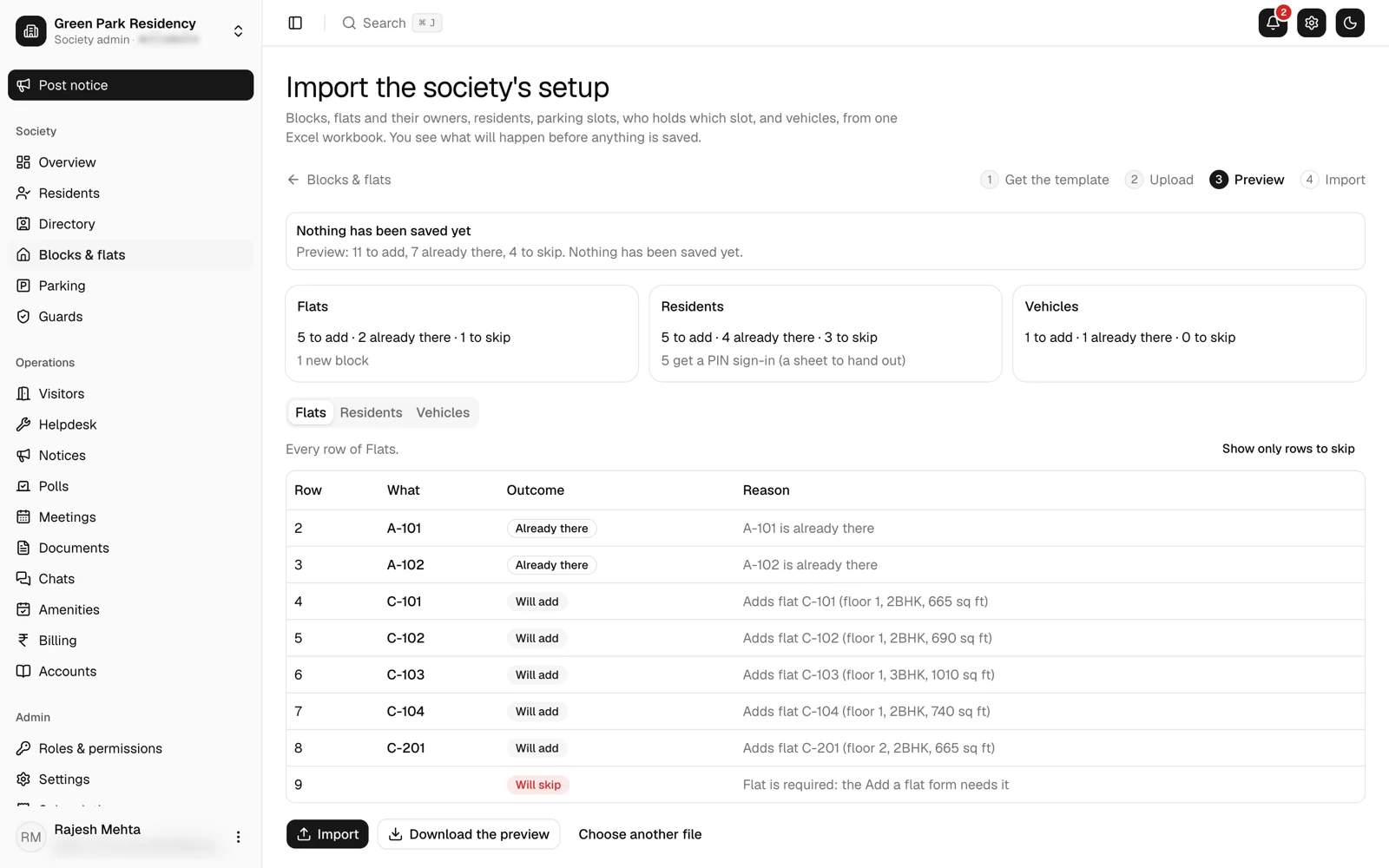
In Ekvasa, the Ekvasa team sets up every society with its committee; no society signs itself up. The office copies homes, residents, parking, vehicles, opening dues, opening balances, amenities and guards into Ekvasa’s Excel templates. Before anything is saved, the committee sees a preview: the rows to add, the rows already there and any row skipped with its reason. See imports and how onboarding works.
Step 6: Train the guards and the office
The gate is where a move goes wrong first, so train the guards before the go-live day, on every shift. Show them how to:
- sign in on the gate phone,
- let in a visitor, a guest with a code and a delivery,
- check daily staff in and out,
- work when the network drops.
In Ekvasa, guards sign in with the society code, a guard ID and a PIN, and every screen is in English, Gujarati or Hindi. See gate security. Train the office and the treasurer on bills, receipts and the books too.
Step 7: Tell residents
Send a notice two weeks ahead, and a reminder the day before. Say what changes, when, and what each home must do.
Dear Residents,

The Managing Committee of [Society name] has decided to move the society's gate, bills and notices to [new app] from [go-live date].

What you need to do:
1. Install [new app] from the App Store or Google Play.
2. Sign in with the mobile number or email the office has for your home.
3. Check your home, family and vehicles, and tell the office if anything is wrong.

Your dues balance as on [cut-off date] has been carried over. Please keep your last receipt from the old app until you see your balance in the new one.

For help, contact [office contact] between [hours].

[Name], Secretary, [Society name]
Step 8: Go live and close the old app
- On the go-live day, guards start the new gate app at the start of a shift.
- Residents sign in and check their homes. In Ekvasa they sign in with their mobile or email and a 6-digit code.
- If the committee wants an overlap, fix its end date, so guards know which app to use.
- After the overlap, export anything still needed from the old app, then close it.
A checklist to copy
[ ] Committee resolution recorded, go-live month: [month]
[ ] Current agreement read: end date [date], notice [days]
[ ] Records exported and saved outside the old app
[ ] Cut-off date fixed: [date]
[ ] Dues list and trial balance on the cut-off date
[ ] New app set up and preview checked
[ ] Opening dues and balances match the old records
[ ] Guards trained on every shift
[ ] Office and treasurer trained
[ ] Notice to residents sent on [date], reminder on [date]
[ ] Go-live day: [date]
[ ] Overlap ends: [date]
[ ] Old app closed on [date]
Questions committees ask
How long does a switch take?
It depends on the size of the society and how ready its records are. The records and the cut-off date usually take the most time.
Can we run both apps for a month?
Yes, if the committee wants. Keep the overlap short and give it an end date, or guards will use both.
What if a home’s opening dues are wrong?
Fix it before the first bill. Check the dues list against the old app’s ledger for that home, correct the opening balance, and tell the home.
For a move to Ekvasa from MyGate, NoBrokerHood, ADDA or ApnaComplex, see what comes across from another app.
Do this in Ekvasa
Ekvasa keeps bills, receipts, notices and records in one app for the office and every home. The Ekvasa team sets your society up with your own data.